Smart TVs have changed the way people watch television. Instead of relying entirely on traditional cable or satellite services, viewers can now use internet-connected applications to organize and play live TV channels, on-demand content, and IPTV playlists. But choosing the best IPTV apps for Smart TV in 2026 is not as simple as downloading the first app you find in an app store. Different IPTV apps support different operating systems, playlist formats, electronic program guides, multi-screen features, parental controls, and user interfaces. An app that works perfectly on an Android TV device may not be available on a Samsung or LG Smart TV. The right choice depends on your TV, your preferred content source, your technical experience, and the features you actually need.
Quick Answer: What Are the Best IPTV Apps for Smart TV in 2026?
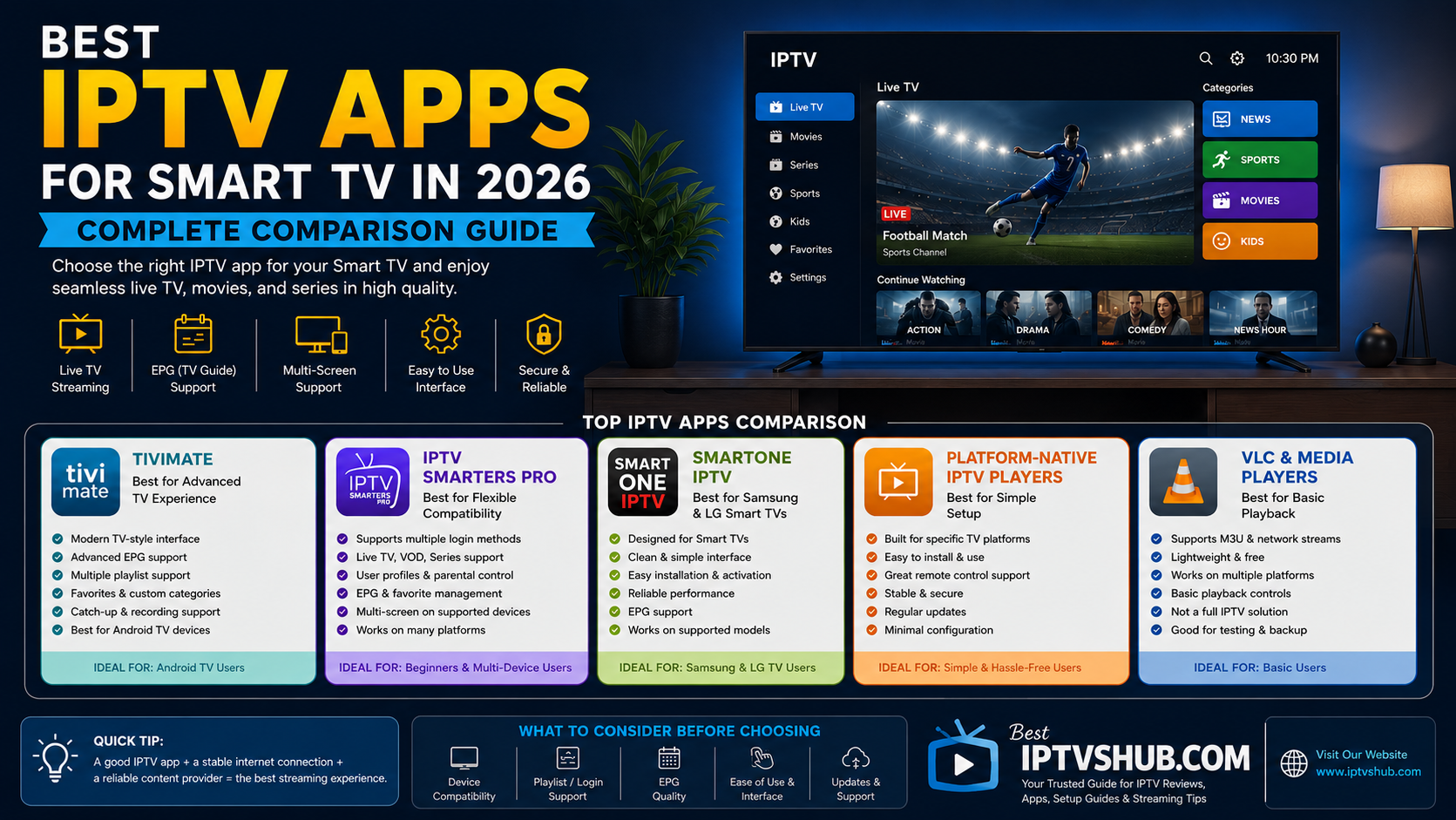
The best IPTV apps for Smart TV in 2026 depend largely on your device. Popular options include TiviMate for Android TV-based devices, IPTV Smarters Pro for broad device compatibility, SmartOne IPTV for supported Smart TVs, and other platform-specific IPTV players. When comparing IPTV apps, look at:
Device compatibility
Playlist and login support
Electronic Program Guide (EPG) features
User interface and navigation
Multi-screen capabilities
Catch-up and recording support
Parental controls
Update frequency
Privacy and security
Ease of setup
The best IPTV app is not necessarily the one with the most features. It is the one that works reliably with your Smart TV and provides an easy, stable viewing experience with your authorized content source.
IPTV App Comparison Table for 2026
IPTV App Type
Best For
Commonly Used On
Key Strength
TiviMate
Advanced TV interface
Android TV and compatible devices
Modern TV-style experience
IPTV Smarters Pro
Flexible compatibility
Multiple supported platforms
Easy playlist and account management
SmartOne IPTV
Smart TV users
Supported Samsung and LG TVs
Designed for TV-based viewing
Platform-native IPTV players
Simple setup
Specific Smart TV operating systems
Easy installation
VLC and media players
Basic streaming
Multiple devices
Flexible media playback
Important: IPTV player availability, supported features, and compatibility can change over time. Always check the official app store or developer information before installation.
What Is an IPTV App?
An IPTV app is a media player or interface that allows users to access and organize television content delivered through an internet connection. Most IPTV apps do not create or own the content themselves. Instead, they act as a player. Depending on the app and service, users may log in using:
M3U playlist URLs
Xtream Codes API credentials
Portal URLs
Device activation methods
Other supported authentication systems
Think of an IPTV app as the television interface and the content service as the source that provides authorized programming. This distinction is important when choosing the best IPTV apps for Smart TV. A high-quality app cannot fix an unreliable internet connection or a poorly managed content source. At the same time, even a good service can feel difficult to use if the IPTV player has a confusing interface.
Why Choosing the Right IPTV App Matters
The IPTV app you choose directly affects the viewing experience. A poor app may result in:
Slow navigation
Difficult channel browsing
Missing program guide information
Complicated setup
Frequent crashes
Limited remote-control support
Difficulty switching between channels
A better app can make the entire experience feel closer to using a modern television platform. For businesses involved in digital services, streaming technology, website development, or online media, this is also a useful example of why user experience matters. A product can have excellent functionality, but if users struggle to navigate it, the overall experience suffers. The same principle applies to websites. At Ash Web Work, we often emphasize that a professional website should not simply look attractive. It should also be easy to navigate, fast, responsive, and designed around what users actually want to do.
1. TiviMate: Best for a Modern TV Experience
TiviMate is widely known among users of compatible Android TV-based devices because of its television-focused interface. Unlike basic media players, TiviMate is designed to provide an experience that feels more like a traditional TV platform.
Key Features
Depending on the version and device, features may include:
Channel categories
Favorites
Electronic Program Guide integration
Multiple playlist support
Search functionality
Customizable interface
Remote-friendly navigation
Catch-up support when provided by the content source
Advanced viewing options
Who Should Choose TiviMate?
TiviMate can be a strong choice for users who:
Use Android TV or compatible streaming devices
Watch a large number of channels
Want an organized interface
Prefer advanced customization
Frequently use an EPG
Example: Imagine a household with hundreds of available channels. A basic IPTV player may simply display a long list. A more advanced TV-focused interface can help organize content into categories such as:
News
Sports
Entertainment
Movies
Kids
International channels
This can significantly improve usability.
Potential Limitation: TiviMate is primarily associated with Android TV-based environments, so Smart TV compatibility should always be checked before selecting it.
2. IPTV Smarters Pro: Best for Flexible Compatibility
IPTV Smarters Pro is one of the most recognized IPTV player brands because it has been associated with multiple device types and a relatively straightforward interface. Its main advantage is flexibility. Depending on platform availability and version, users may be able to access content through supported login methods rather than manually managing every playlist.
Key Features
Common features can include:
Live TV organization
Movies and video-on-demand sections
Series organization
Multiple user profiles or accounts
EPG support
Search tools
Favorites
Parental controls
Multi-screen features on supported versions
Who Is It Best For?
This type of IPTV app can be useful for users who want:
A familiar interface
Simple login options
Support for different content categories
Compatibility across multiple devices
A relatively easy setup process
For beginners, IPTV Smarters-style interfaces can be easier to understand because content is often separated into clear sections.
3. SmartOne IPTV: A Practical Smart TV Option
SmartOne IPTV is designed for supported Smart TV platforms and is particularly relevant for users who want to avoid connecting an additional streaming device. Instead of purchasing a separate Android TV box or streaming stick, users may be able to install a compatible IPTV player directly on their television.
Why This Can Be Useful
A direct Smart TV app can mean:
Fewer devices
Fewer cables
One remote control
Faster access to the application
A simpler home entertainment setup
Best For: SmartOne IPTV-style solutions can be useful for:
Samsung Smart TV users
LG Smart TV users
Users who prefer direct TV installation
People who want a simple interface
However, Smart TV operating systems can have limitations compared with dedicated Android TV devices. Before choosing an app, confirm:
Whether the app supports your TV model.
Whether it is available in your region.
Which playlist or login methods it supports.
Whether an activation process or additional cost applies.
4. Platform-Native IPTV Players: Best for Simple Setup
Some Smart TV ecosystems offer IPTV players specifically developed for that operating system. For example, an app designed specifically for a particular television platform may provide better remote control support and easier installation. The advantage is simplicity. You may not need to connect:
A Fire TV device
An Android TV box
An Apple TV
Another external streaming device
Advantages
Easy installation
Designed for the TV remote
Fewer compatibility problems
Simple navigation
Disadvantages
Fewer advanced features
Limited customization
Restricted app availability
Some Smart TVs receive software support for a limited period
For casual viewers, a simple platform-native app may be all that is needed.
5. VLC and General Media Players: Best for Basic Playback
General media players such as VLC can support certain network streams and playlist formats. These applications are useful for testing or basic media playback. However, they are usually not designed to provide a complete television-style IPTV experience. You may miss features such as:
Advanced EPG integration
Channel logos
TV-focused layouts
Favorites management
Multi-account organization
Catch-up navigation
For occasional use, a general media player may be sufficient. For daily television viewing, a dedicated IPTV app is usually more convenient.
How to Choose the Best IPTV App for Your Smart TV
Before downloading anything, identify your television platform.
Step 1: Check Your Operating System: The operating system determines which applications are available. Your TV may use:
Android TV
Google TV
Samsung Tizen
LG webOS
Fire TV
Apple TV through an external device
Another Smart TV operating system
Step 2: Check Your Content Source Requirements: Different IPTV services may support different login methods. Choose an app that supports the method you actually need. Ask whether your authorized service supports:
M3U playlists
Xtream Codes API
Portal URLs
EPG URLs
Device activation
Step 3: Consider Your Viewing Habits: Your answers will help narrow down the best option. Ask yourself:
Do I watch mostly live TV?
Do I need a detailed program guide?
Do I frequently watch sports?
Do I want separate profiles?
Do I need parental controls?
Do I want favorites and categories?
Do I watch on multiple devices?
Best IPTV Apps for Different Smart TV Users
Best for Android TV Users: Android TV users generally have access to a wider range of IPTV applications. A TV-focused player with playlist management, EPG support, and remote-friendly navigation is often the best choice.
Best for Samsung Smart TV Users: Samsung TV users should look for applications available through their compatible app ecosystem. Before choosing, check the specific TV model and software version.
Best for LG Smart TV Users: LG Smart TV users should focus on applications compatible with webOS. Because availability can differ by model and region, compatibility should be confirmed before purchasing an activation or subscription.
Best for Beginners: Avoid choosing an app simply because it has the longest feature list. Beginners should prioritize:
Simple setup
Clear menus
Easy login
Search functionality
Reliable EPG display
Best for Advanced Users: Advanced users may prefer:
Multiple playlist support
Custom categories
Interface customization
Advanced EPG management
Multi-screen functionality
External player integration
M3U vs Xtream Codes: Which Is Easier?
Two common IPTV connection methods are M3U playlists and Xtream Codes API credentials.
M3U Playlist
An M3U playlist is typically a URL or file containing streaming information.
Advantages
Widely supported
Flexible
Easy to transfer between compatible apps
Potential Challenges
Setup can be more manual
Long URLs can be difficult to enter using a TV remote
Updates may require playlist changes
Xtream Codes API
This method typically uses information such as:
Server URL
Username
Password
Advantages
Often easier to organize
Can automatically separate live TV, movies, and series
May work more smoothly with supported EPG features
The best option depends on what your authorized content provider supports.
Best Practices for Using IPTV Apps on Smart TVs
Following a few basic best practices can improve reliability.
1. Use a Stable Internet Connection: Streaming quality depends heavily on connection stability. For higher-quality streams, a stable broadband connection is more important than simply having a high advertised speed. If possible:
Use Ethernet for stationary TVs
Position Wi-Fi routers properly
Reduce unnecessary network congestion
Update router firmware when appropriate
2. Keep Your Smart TV Updated: Check your TV’s software settings periodically. Software updates can improve:
App compatibility
Security
Performance
Network stability
3. Keep the IPTV App Updated: Install updates through official sources when available. Older app versions may eventually experience:
Login issues
Compatibility problems
Missing features
Security concerns
4. Organize Your Favorites: If you regularly watch only 20 channels out of several hundred, create a favorites list. This can dramatically improve the daily experience.
5. Use a Reliable and Authorized Content Source: The app is only one part of the experience. Use legitimate, authorized streaming services and respect applicable copyright and broadcasting laws.
Common Mistakes to Avoid
Choosing the best IPTV apps for Smart TV in 2026 becomes easier when you avoid these common mistakes.
Mistake 1: Choosing an App Before Checking Compatibility: Do not assume an app available on Android TV will also work on Samsung or LG. Always check your:
TV brand
Model
Operating system
Region
Mistake 2: Paying for an Activation Before Testing Compatibility: If an application uses a paid activation model, confirm that it supports your device and intended connection method before paying.
Mistake 3: Ignoring EPG Compatibility: A program guide can make a major difference to the viewing experience. Check whether:
The app supports EPG
Your content source provides EPG data
The guide updates correctly
Mistake 4: Blaming the App for Every Buffering Problem: Test your network and device before assuming the player is the problem. Buffering can be caused by:
Wi-Fi interference
Internet instability
Network congestion
TV hardware limitations
Server-side issues
Mistake 5: Installing Apps from Untrusted Sources: Security matters. Whenever possible, download applications from official stores or verified developer sources. Avoid unknown files that request unnecessary permissions or contain suspicious software.
Mistake 6: Buying the Most Expensive Device Without Understanding Your Needs: An expensive streaming device is not always necessary. If your Smart TV already supports the app and performs well, an external device may not provide enough additional value.
IPTV App Performance: What Actually Affects It?
Users often ask which app is “fastest.” The answer depends on several factors.
Internet Connection: A strong connection helps, but stability is critical. An unstable high-speed connection can still cause interruptions.
TV Hardware: Older Smart TVs may have:
Less memory
Slower processors
Older software
Limited app support
App Optimization: Well-designed apps typically offer:
Faster navigation
Better remote response
More efficient memory usage
Clearer channel organization
Stream Quality: Higher-resolution streams generally require more bandwidth and processing resources. For example:
HD requires less bandwidth than 4K.
4K streaming can place greater demands on both the network and device.
The best solution is to balance quality and reliability.
IPTV Apps vs Built-In Smart TV Streaming Apps
A Smart TV already comes with applications for popular streaming platforms. So why use an IPTV player?
The difference is primarily flexibility. A dedicated streaming service usually provides its own application and content library. An IPTV player may allow compatible users to organize authorized channels or streams from an external source.
Built-In Streaming Apps: Usually offer:
Simple setup
Official content integration
Automatic updates
Strong brand support
IPTV Players: May offer:
Playlist flexibility
Channel organization
EPG support
Multiple content categories
Custom viewing layouts
The best choice depends on how you consume content.
A Practical Example: Choosing the Right IPTV App
Consider three different users.
User A: The Beginner
They own a Samsung Smart TV and want a simple interface.
Best approach: Choose a compatible, easy-to-install Smart TV IPTV player with straightforward navigation.
User B: The Advanced Viewer
They use an Android TV device and manage multiple playlists.
Best approach: Choose an Android TV-focused app with advanced organization and customization features.
User C: The Multi-Device Household
Different family members use Smart TVs, tablets, and streaming devices.
Best approach: Look for a legitimate service and compatible player ecosystem that supports their required devices.
This is why there is no single answer to the question, “What is the best IPTV app?”
The best option depends on the user.
How Small Businesses Can Learn from IPTV App Design
At first, IPTV apps may seem unrelated to business websites. But there is an important connection: user experience determines whether people stay or leave. A confusing IPTV interface can make users abandon an app. A confusing website can make potential customers leave without contacting the business. Small businesses should apply the same principles:
Make navigation simple.
Reduce unnecessary steps.
Prioritize mobile responsiveness.
Improve website speed.
Use clear calls to action.
Organize information logically.
Help visitors find what they need quickly.
FAQs: Best IPTV Apps for Smart TV in 2026
1. What is the best IPTV app for Smart TV in 2026?
The best IPTV app depends on your Smart TV operating system and the features you need. Android TV users may prefer a TV-focused app such as TiviMate, while users of other Smart TV platforms may need a compatible application designed specifically for their operating system. Check compatibility, EPG support, login options, ease of use, and update availability before choosing.
2. Can I install an IPTV app directly on my Smart TV?
In many cases, yes. Samsung, LG, Android TV, Google TV, Fire TV, and other platforms may support IPTV applications. However, availability depends on the device model, operating system version, region, and the application’s current platform support.
3. Do IPTV apps provide TV channels?
Generally, an IPTV player acts as software for accessing and organizing streams or content credentials provided by another source. The app itself may not own or provide the channels. Always use properly licensed and authorized content sources.
4. Which is better for IPTV: a Smart TV app or a Firestick?
A built-in Smart TV app is convenient because it requires fewer devices and cables. A Fire TV or Android TV device may offer more app choices, better hardware performance, and longer flexibility for some users. The best option depends on your TV’s age, performance, and the applications you need.
5. Why does my IPTV app keep buffering?
Buffering can be caused by several factors, including Wi-Fi interference, unstable internet, network congestion, insufficient device performance, stream quality, or problems with the authorized content source. Try testing your connection, restarting your router, using Ethernet where practical, and checking whether other streaming apps work normally.
6. Is M3U or Xtream Codes better for IPTV apps?
Neither method is universally better. M3U playlists are widely supported and flexible, while Xtream Codes credentials can offer easier organization on compatible apps. The best choice depends on the app you use and the connection method supported by your authorized service.
7. How do I choose a safe IPTV app?
Choose applications from official app stores or verified developer sources whenever possible. Review the permissions requested, keep the app updated, and avoid suspicious downloads. Also make sure you use legitimate and authorized content services that comply with applicable copyright and broadcasting laws.
Conclusion
Choosing the best IPTV apps for Smart TV in 2026 is about more than selecting the app with the biggest feature list. The right app should match your device, viewing habits, technical requirements, and preferred user experience. For Android TV users, a TV-focused app with advanced playlist and EPG features may be ideal. For Samsung or LG Smart TV users, a compatible platform-specific application may provide the simplest setup. Beginners may prefer an easy interface, while advanced users may value customization and multiple playlist support. Before making a decision, remember these key points:
Check Smart TV compatibility first.
Choose an app that supports your preferred login method.
Consider EPG and channel organization.
Keep your TV and applications updated.
Use a stable internet connection.
Download software from trusted sources.
Use legitimate, authorized content services.
A good IPTV app should make content easier to discover, organize, and enjoy.