


Best IPTV Devices in 2026: Firestick vs Android TV vs Apple TV

Introduction
Choosing the best IPTV device in 2026 is no longer just about buying the cheapest streaming stick. Your device affects app compatibility, interface speed, Wi-Fi performance, storage, remote control experience, 4K playback, and how easily you can use legitimate IPTV and streaming services. Three categories dominate the conversation:
Amazon Fire TV devices
Android TV and Google TV boxes
Apple TV
Each has strengths. A Fire TV Stick can be compact and affordable. An Android TV or Google TV device can offer excellent flexibility and app choice. Apple TV 4K provides a premium experience with powerful hardware and tight integration with the Apple ecosystem.
This guide compares Firestick vs Android TV Box vs Apple TV to help you choose the best IPTV device for your needs in 2026.
Quick Answer: What Is the Best IPTV Device in 2026?
For most users, a certified Android TV or Google TV device offers the best overall flexibility for IPTV and streaming apps. The current Google TV Streamer, for example, supports 4K HDR at up to 60 FPS, Dolby Vision, HDR10+, Dolby Atmos, 32 GB of storage, 4 GB of memory, and Gigabit Ethernet.
A Fire TV Stick 4K or 4K Max is an excellent choice for users who want a compact streaming device with a familiar interface and strong value. Amazon lists the Fire TV Stick 4K Max as supporting Wi-Fi 6E, 16 GB of storage, 4K formats, Dolby Vision, and Dolby Atmos.
Apple TV 4K is the premium choice. Its current hardware includes an A15 Bionic chip, Wi-Fi 6, HDMI 2.1, and either 64 GB of storage or 128 GB with Gigabit Ethernet.
The Simple Recommendation
Best for value: Fire TV Stick
Best for flexibility: Android TV or Google TV
Best premium experience: Apple TV 4K
Best for advanced users: Android TV hardware
Best for Apple households: Apple TV 4K
The most important rule is simple: check compatibility with the legitimate apps and services you plan to use before purchasing the device.
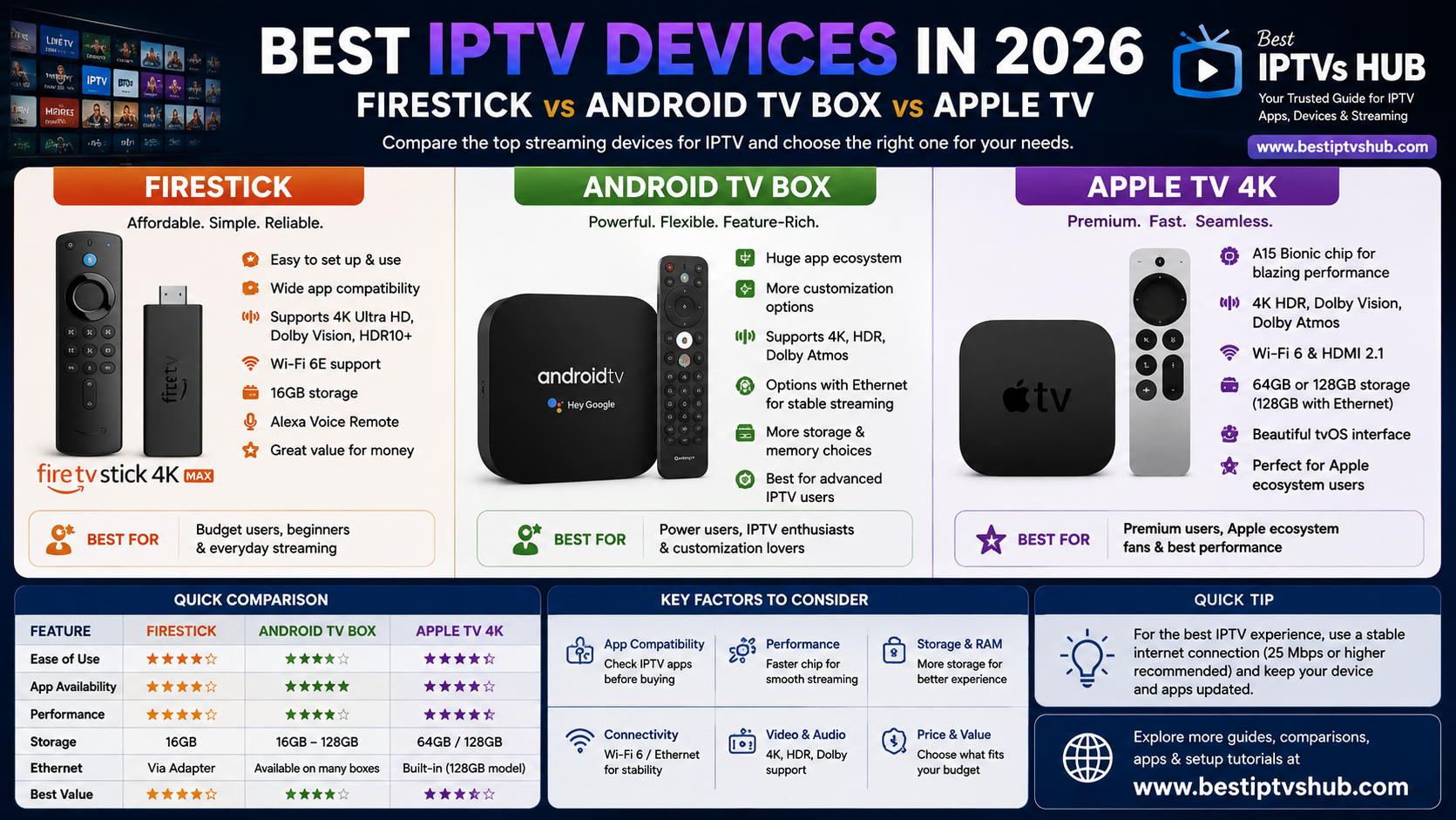
Firestick vs Android TV Box vs Apple TV: Comparison Table
| Feature | Fire TV Stick | Android TV / Google TV Box | Apple TV 4K |
|---|---|---|---|
| Ease of setup | Excellent | Excellent to Moderate | Excellent |
| IPTV app flexibility | Good | Excellent | Good, but more limited |
| App ecosystem | Amazon ecosystem | Google Play ecosystem | Apple App Store |
| Advanced customization | Moderate | Excellent | Limited |
| 4K support | Available on 4K models | Available on supported models | Yes |
| Ethernet | Adapter on many stick models | Available on some boxes | Built into 128 GB model |
| Storage | Varies by model | Varies significantly | 64 GB or 128 GB |
| Best for | Budget and convenience | Flexibility and customization | Premium performance |
| Ideal user | Casual streamer | Power user or app enthusiast | Apple ecosystem user |
Specifications vary by device model, generation, and region. Always check the exact model before buying.
Why Your IPTV Device Matters
An IPTV app is only one part of the streaming experience. The hardware underneath it can influence:
App loading speed
Channel switching
Video playback
Wi-Fi stability
Storage availability
Multitasking
Remote responsiveness
Software support
4K and HDR capabilities
For example, an older Smart TV may technically support an IPTV player but struggle with a large electronic program guide or a complex interface. Connecting a dedicated streaming device can improve the experience by providing newer hardware and a more actively supported operating system. The same principle applies to websites and digital platforms. Technology is not useful simply because it has more features. It needs to provide a smooth experience for the person using it.
At Best IPTVs HUB, we focus on helping users understand the relationship between devices, apps, setup methods, and streaming performance so they can make more informed decisions.
Option 1: Fire TV Stick
Amazon Fire TV devices remain a popular choice because they are compact, easy to connect to a television, and available across different performance and price levels. The Fire TV Stick 4K Max, for example, offers 16 GB of storage and Wi-Fi 6E support, while also supporting 4K playback and major HDR formats including Dolby Vision.
Advantages of Fire TV
1. Simple Setup
A Fire TV Stick connects directly to an HDMI port. The basic process is:
Connect the device to your TV.
Connect it to power.
Join your Wi-Fi network.
Sign in to your Amazon account.
Install compatible applications.
This makes Fire TV accessible to beginners.
2. Compact Design
The device can sit behind the television, reducing clutter. This makes it useful for:
Living rooms
Bedrooms
Hotel travel
Secondary TVs
3. Good Value
Fire TV devices typically provide strong streaming functionality without requiring the price of a premium set-top box.
4. Voice Remote
Supported models include Alexa-based voice features, which can make searching and navigation easier.
Potential Limitations
Fire TV may not provide the same level of flexibility as a fully featured Android TV box. The software ecosystem can also evolve. Amazon has announced that future Fire TV Sticks starting with the Fire TV Stick 4K Select will run on Vega, making it even more important to verify long-term compatibility with the apps you rely on before buying a new device.
Best For: Choose a Fire TV device if you want:
Good value
Simple installation
A compact design
Strong mainstream streaming support
A familiar TV interface
Option 2: Android TV and Google TV Boxes
For many users, Android TV and Google TV devices offer the strongest combination of flexibility and usability. Unlike a single device category, Android TV includes many different products with varying hardware specifications. This means you should not simply search for “Android TV box” and buy the cheapest option available. Look for a reputable, certified device.
Google TV Streamer
Google's current Google TV Streamer provides a useful example of what a modern certified device can offer. According to Google's specifications, it includes:
Up to 4K HDR at 60 FPS
Dolby Vision
HDR10+
HLG
Dolby Atmos
4 GB memory
32 GB storage
HDMI 2.1
Gigabit Ethernet
Android TV OS
For IPTV users, the 32 GB storage and built-in Ethernet are particularly useful advantages.
Why Android TV Is Flexible
Android TV and Google TV can support a broad range of applications through the Google ecosystem. Depending on the device and app availability, users may find:
IPTV players
Video streaming apps
Media players
File management tools
Home entertainment applications
Casting features
This makes Android TV a strong option for users who want more control over their streaming environment.
NVIDIA SHIELD TV Pro
For more demanding users, NVIDIA's SHIELD TV Pro remains a notable premium Android TV device. Its official specifications include:
Tegra X1+ processor
3 GB RAM
16 GB storage
USB expansion
Gigabit Ethernet
4K HDR playback
Dolby Vision
Android TV support
Its expandable storage and Gigabit Ethernet make it particularly appealing to advanced users.
Advantages of Android TV
Broad app ecosystem
Flexible device choices
Advanced customization
Strong support for media applications
Options ranging from affordable to premium hardware
Potential Limitations: The biggest challenge is device quality. A low-cost, uncertified Android box may have:
Weak processors
Limited updates
Poor Wi-Fi hardware
Security concerns
Inconsistent app compatibility
That is why buying a reputable, certified device is usually a better long-term decision.
Best For: Android TV or Google TV is ideal for:
Users who want flexibility
People who use multiple streaming applications
Advanced IPTV users
Users who want Ethernet
People who prefer customization
Option 3: Apple TV 4K
Apple TV 4K is designed for users who want a polished, premium streaming experience. The current Apple TV 4K uses the A15 Bionic chip and comes in:
64 GB Wi-Fi model
128 GB Wi-Fi + Ethernet model
Both versions support Wi-Fi 6 and HDMI 2.1, while the 128 GB model includes Gigabit Ethernet and Thread support.
Advantages of Apple TV 4K
1. Strong Performance: Apple's A15 Bionic chip provides significantly more processing power than many budget streaming devices. This can result in:
Fast navigation
Quick app switching
Smooth animations
Strong overall responsiveness
2. Premium Video and Audio Features: Apple TV 4K supports:
4K
Dolby Vision
HDR10+
Dolby Atmos on supported setups
3. Apple Ecosystem Integration: Apple TV works particularly well for users who already use:
iPhone
iPad
Mac
AirPlay
Apple Music
Apple Photos
HomeKit-compatible devices
4. Ethernet Option: The 128 GB version includes Gigabit Ethernet, which can be useful for users who prefer a wired network connection.
Potential Limitations: Apple TV is generally more expensive than Fire TV or many Android TV devices. It is also less flexible for users who depend on niche or platform-specific applications. Before buying Apple TV specifically for IPTV use, check that your preferred legitimate IPTV player is available for tvOS.
Best For: Apple TV 4K is best for:
Apple ecosystem users
Premium home entertainment setups
Users who prioritize speed
Users who want a polished interface
People who prefer long-term mainstream platform support
IPTV App Compatibility: The Most Important Buying Factor
Before comparing processors or storage, ask one question: Does the device support the apps you actually want to use? This is especially important because app availability can differ between:
Fire TV
Android TV
Google TV
Apple TV
Samsung Tizen
LG webOS
An IPTV player available on Android TV may not be available on Apple TV. Likewise, a Smart TV application may not exist on every Fire TV device. Before purchasing:
Identify the legitimate IPTV or streaming service you use.
Check which official apps or supported players it requires.
Verify device compatibility.
Check your region.
Confirm current app availability.
This simple process can prevent buying the wrong hardware.
Firestick vs Android TV Box vs Apple TV: Performance
Processing Power
Apple TV 4K generally has a significant advantage in raw processing performance thanks to its A15 Bionic chip. Premium Android devices such as NVIDIA SHIELD TV Pro are also designed for demanding media workloads. Fire TV devices prioritize a balance between performance, compact size, and price. For basic IPTV and mainstream streaming, raw processing power is not the only consideration.
Storage
Storage becomes important when you install multiple applications. Current examples include:
Fire TV Stick 4K Max: 16 GB
Google TV Streamer: 32 GB
Apple TV 4K: 64 GB or 128 GB
NVIDIA SHIELD TV Pro: 16 GB, expandable via USB storage
For users who install many apps, 32 GB or more can provide additional breathing room.
Network Performance
For reliable high-quality streaming, stability is often more important than headline internet speed. A wired Ethernet connection can help reduce:
Wi-Fi interference
Signal drops
Network inconsistency
Google TV Streamer and the 128 GB Apple TV 4K both include Ethernet connectivity. NVIDIA SHIELD TV Pro also includes Gigabit Ethernet.
Which Device Is Best for Different Users?
Best for Beginners: Fire TV Stick
If you want:
Simple installation
Easy navigation
Compact hardware
Good value
A Fire TV Stick can be an excellent starting point.
Best Overall Flexibility: Google TV or Android TV
For users who want:
More app choices
IPTV player flexibility
Customization
Modern hardware options
A reputable Android TV or Google TV device is often the best overall choice.
Best Premium Device: Apple TV 4K
If budget is less important and you value:
Fast performance
A polished interface
Apple ecosystem integration
Premium audio and video support
Apple TV 4K is a strong choice.
Best for Power Users: NVIDIA SHIELD TV Pro
Users who need:
Advanced media playback
USB connectivity
Gigabit Ethernet
Expandable storage
High-end Android TV functionality
May find SHIELD TV Pro especially appealing.
Common Mistakes to Avoid
1. Buying the Cheapest Uncertified Android TV Box: Low prices can be attractive, but unsupported hardware may cause:
Security problems
Missing app support
Poor updates
Weak performance
2. Ignoring App Compatibility: Do not assume every IPTV app works on every platform. Check before buying.
3. Buying More Power Than You Need: A premium device is unnecessary if you only watch a few mainstream streaming apps and your current setup works perfectly. Match the device to your needs.
4. Ignoring Network Quality: A powerful device cannot completely compensate for an unstable internet connection. Test:
Wi-Fi strength
Router placement
Network congestion
Ethernet availability
5. Forgetting About Storage: Installing multiple apps on a low-storage device can eventually create performance problems. Check the storage specification before purchasing.
6. Using Untrusted Applications: Install applications from official stores or trusted developer sources whenever possible. Avoid suspicious software that requests unnecessary permissions.
Best Practices for Choosing an IPTV Device
1. Choose Certified Hardware: Certified devices generally provide better:
Security
App compatibility
Software support
Overall reliability
2. Prioritize Network Stability: For 4K streaming, a stable connection is essential. If your Wi-Fi signal is weak, consider:
Moving the router
Using a mesh network
Connecting through Ethernet where supported
3. Check Your TV Specifications: Make sure your television supports the features you want to use. For example, buying a 4K HDR streaming device will not magically turn a non-4K television into a 4K display.
2. Ignoring App Compatibility: Updates can improve:
Security
Performance
Compatibility
Bug fixes
5. Avoid Buying Based on Marketing Alone: Compare:
Processor
Memory
Storage
Wi-Fi support
Ethernet
App ecosystem
Software support
The best IPTV device is the one that fits your actual usage.
A Practical Buying Example
Imagine three different users.
User A: Casual Viewer
They watch live television, movies, and a few streaming apps.
Recommendation: A current Fire TV Stick or reputable Google TV device.
User B: Advanced IPTV User
They use multiple legitimate media apps and value customization.
Recommendation: A certified Android TV or Google TV device.
User C: Apple Household
They use iPhones, iPads, AirPlay, and Apple services.
Recommendation: Apple TV 4K.
Choosing based on your existing ecosystem often produces a better experience than simply buying the device with the highest specifications.
How Streaming Devices Relate to User Experience
The best streaming device should make technology feel invisible. Users should be able to:
Turn on the TV
Open an app
Find content
Start watching
Without unnecessary complications. This principle also applies to websites. Small businesses, startups, and local businesses need digital experiences that are simple and intuitive. A visitor should quickly understand:
What the business offers
Where to find information
How to contact the business
What action to take
The same focus on speed, navigation, and usability is essential for any successful digital platform. For IPTV users, Best IPTVs HUB helps simplify the technical side by publishing practical guides on devices, IPTV apps, Smart TVs, setup methods, and troubleshooting.
FAQs: Best IPTV Devices in 2026
1. What is the best IPTV device in 2026?
For overall flexibility, a certified Android TV or Google TV device is often the strongest choice because of its broad application ecosystem. Fire TV is an excellent value option, while Apple TV 4K is a premium choice for users who prioritize performance and Apple ecosystem integration.
2. Is Firestick good for IPTV?
Yes, a current Fire TV device can provide a good IPTV experience when used with compatible and legitimate applications. Models vary in storage, networking, and performance, so check the exact Fire TV model before buying.
3. Is an Android TV box better than a Firestick?
It depends on the device. A reputable Android TV or Google TV box can provide more flexibility, storage, Ethernet connectivity, and customization. However, a low-quality uncertified Android box may perform worse than a current Fire TV Stick.
4. Is Apple TV good for IPTV?
Apple TV 4K offers excellent performance and a polished user interface. However, IPTV app availability depends on tvOS support. Before purchasing, confirm that the legitimate player or service you intend to use is available on Apple TV.
5. Do I need Ethernet for IPTV?
Ethernet is not required, but it can provide a more stable connection than Wi-Fi in some homes. It can be particularly useful when the router is far from the television or when the network experiences interference and congestion.
6. How much storage do I need for a streaming device?
For basic streaming, relatively modest storage can be sufficient. If you install many applications, store downloaded media, or use a device for broader entertainment purposes, 16 GB, 32 GB, or more can provide greater flexibility. Always remember that part of the advertised storage is used by the operating system.
7. Should I buy a Smart TV or a separate IPTV device?
A built-in Smart TV platform is convenient, but a dedicated streaming device can provide newer hardware, a broader app ecosystem, and potentially longer software support. If your current Smart TV feels slow or lacks the apps you need, a dedicated device may be a worthwhile upgrade.
Conclusion
The best IPTV devices in 2026 depend on what you value most.
A Fire TV Stick is an excellent choice for affordability, simplicity, and everyday streaming. A certified Android TV or Google TV device offers the greatest flexibility and is often the best overall option for users who want more control over their app environment.
Apple TV 4K stands out for premium performance, strong hardware, and integration with the Apple ecosystem.
Before making your final decision, remember to:
Check IPTV app compatibility.
Choose reputable, certified hardware.
Consider storage and network requirements.
Prioritize a stable internet connection.
Check whether Ethernet is important for your setup.
Keep your device updated.
Use legitimate and authorized streaming services.
The right device should make streaming easier, faster, and more enjoyable—not add unnecessary complexity.
Call to Action
Looking for more help choosing the right streaming device, IPTV app, or Smart TV setup?
Best IPTVs HUB provides practical guides, comparisons, setup tutorials, and troubleshooting resources to help users understand IPTV technology and choose compatible devices with confidence.
Explore more guides from Best IPTVs HUB to compare IPTV apps, Fire TV devices, Android TV hardware, Apple TV, Smart TV platforms, and streaming technology.
Visit Best IPTVs HUB and find the right and best server like FOX player, IB player, IBO TV and many more.